Prologue: one phone call
"Mr. Kim, could you find the materials from the lecture you gave at Hyundai WIA five years ago? That B2B sales scenario analysis you used was really good."
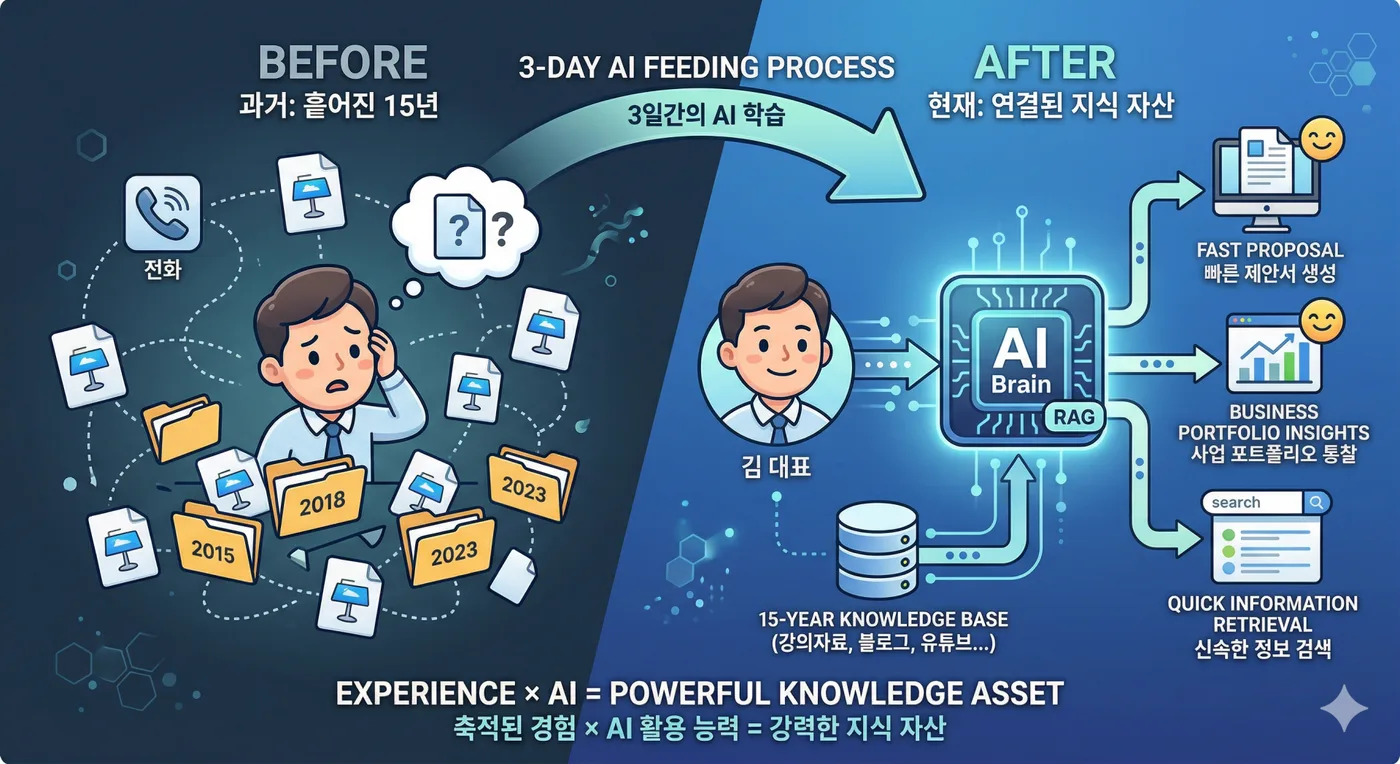
Friday afternoon, a familiar request came in. I reflexively opened Google Drive. 'Clients' folder → 'Hyundai WIA' → 2018? 2019? I open the folder. Eight Keynote files. I open them one by one. "Not this one…" Close it. I dig through another folder. 'Lecture materials' → 'B2B Sales' → more than 40 files.
In the end, it took 45 minutes to find it. Or, to be precise, I found a file that seemed like the right one. I wasn’t 100% sure.
This happens all the time. Over 15 years of teaching, I have made more than 2,000 Keynote files alone. Add client-specific proposals, curricula, contracts, and analysis materials, and the total runs to tens of thousands. I would think, "It's definitely somewhere…" but finding that 'somewhere' was a chore every single time.
And there was a bigger problem. The posts I wrote on my blog, the lectures I gave on YouTube, the theories I summarized in my books — all of it was scattered in separate places. On the same topic, I wrote one thing on my blog, said another in a lecture, and framed it differently again in a book. It was my own knowledge, and even I could not see all of it at a glance.
So I decided: "I’m handing my entire 15 years over to AI."
Day 1: Wrestling with 2,023 Keynote files
The slog begins
Saturday morning, 7 a.m. I made a cup of coffee and sat down at my MacBook. The plan was simple: put all of my lecture materials into a database that AI can search. Technically, that means building a RAG (Retrieval-Augmented Generation) system. In plain terms, it means **"building an AI assistant that remembers all of my materials."**
The first hurdle was the Keynote files. I had to convert 2,023 of them to PDF first. I tried batch conversion with Automator on my Mac. At first it went smoothly. 100 files, 200… then it stalled at around 500. Files with special characters in their names threw errors. Parentheses, pound signs, ampersands — file names I had never given a second thought over 15 years tripped me up.
I asked Claude Code: "Write a conversion script that also handles filenames with special characters." It was solved in 5 minutes. In the past, I would have spent half a day digging through Stack Overflow.
73,000 slides
Once the PDF conversion finished, I extracted the text from each slide. At an average of 36 slides per file, the 2,023 files yielded 73,000 slides of text.
But then a problem came up. A large share of the slides contained only "…", a page number, or nothing at all. Noise like this pollutes search results. When I looked for meaningless records under 20 characters, I found 7,983 of them. I deleted them all.
15 years of client folders
Course materials alone weren’t enough. I keep a folder for each client: Hyundai Motor, Samsung Electronics, LG, POSCO… Each folder holds training proposals, customized curricula, pre-analysis materials, and contracts.
I extracted all of it as text and loaded it into the database. 67,000 file chunks were added. At 11 p.m., day one was over. My eyes were burning, but seeing 140,000 records in the database felt great.
Day 2: Digitizing my entire life
8,590 Google Contacts
Sunday morning, day two began. Today's goal: load in everything except my lecture materials.
First, Google Contacts. It holds 8,590 contacts of people I have met over 15 years in the training field. Names, companies, titles, emails — I vectorized these and loaded them in too. Now if I search "Samsung Electronics marketing team contact," the relevant contacts come up ranked by similarity.
Blogs, YouTube, and Books
Next up is content.
499 Naver blog posts. These are the B2B marketing, sales, and negotiation articles I have written steadily since 2012. I ran a crawler to collect them all and converted them to vectors.
215 YouTube videos. I extracted the captions and saved the metadata and comments along with them. Now what I said in my videos is searchable as text. Search for "how to build customer trust in B2B marketing," and what I explained in a 2024 video comes up.
200 Brunch posts. These are written in more of an essay style: marketing trends, stories from the training floor, and lessons from running a one-person business.
I split my book, B2B Marketing Design, into 345 chunks and loaded them in. Now AI can answer while citing the content of my book.
10 website columns. The columns I published on the Nanum Consulting website were included too.
By nightfall, the database looked like this:
Data sourceCount
| Lecture slides | 73,000 slides |
| Client files | 67,000 items |
| Google Contacts | 8,590 people |
| Blog | 499 |
| YouTube | 215 |
| Books | 345 chunks |
| Brunch | 200 |
| Website Articles | 10 courses |
Fifteen years of my working life, gathered into a single database.
Day 3: Teaching AI what 'meaning' means
Vectorization — searching by meaning, not words
The key task on day three was vectorization. Put simply, it gives every piece of text a 'meaning coordinate' that AI can understand.
Regular search is keyword matching. Search for "marketing," and it only finds documents containing the word "marketing." Vector search is different. Search for **"strategies for delivering value to customers,"** and it finds lecture materials, blog posts, and YouTube captions that are semantically related, even without the word "marketing."
I used an embedding model called Voyage AI. Applying 1,024-dimensional vectors to more than 150,000 pieces of text took several hours, but the results were remarkable.
Completing the hybrid search
Pure vector search wasn’t enough. For proper nouns like "Hyundai WIA" or "Samsung Electronics," exact keyword matching works better than semantic search. So I built a hybrid search that combines vector search with keyword search.
Vectors find content with similar meaning, and keywords find exact names or dates. It gets you the best of both worlds.
Automatic categorization
I automatically sorted more than 2,000 lectures into 14 categories: B2B marketing, AI, startups, TRIZ/creativity, leadership, negotiation… I analyzed keyword patterns in the titles and finished the classification with a single SQL query. Now I can even search just the "AI lecture materials."
The magic of the words "Hyundai Wia"
With everything set up, I nervously typed **"Hyundai Wia"** into the search bar.
2.6 seconds.
Results poured onto the screen.
Industry: Automotive parts manufacturing
A major parts supplier within the Hyundai Motor Group
Revenue: KRW 1.9224 trillion (≈ US$1,438,276,200) (+0.7% year over year)
Operating margin: 6.4%
New growth drivers: Expansion of the Seosan engine plant, entry into Mexico…
An analysis I had filed in a client folder three years ago surfaced automatically, with its source shown: "Client files - Hyundai WIA analysis materials". The AI pulled together in 2.6 seconds what used to take digging through 3-4 folders.
What came next was even more surprising. I searched for **"B2B marketing strategy"**.
Slides on relationship marketing and solution marketing came up from my lecture materials. Subtitles from my B2B Marketing A to Z videos on YouTube came up with them. The marketing strategy sections I wrote in client proposals were added too. Content I had created over 15 years, in different media and different forms, was now neatly organized under a single question.
In that moment, I realized this was not just a search tool. Fifteen years of scattered knowledge was coming together in one place.
Daily life now: before & after
Before: half a day per proposal
When a training proposal request came in, I used to follow this process.
- Client research: browsing their website, searching news, digging through existing materials — 1 hour
- Finding the right curriculum: checking similar past training records — 30 minutes
- Writing the proposal: revising the curriculum, attaching instructor profiles — 1 hour
- Writing the proposal email — 30 minutes
Total: 3 hours. And this repeats 2–3 times every week.
After: done in 30 minutes
Now it works like this.
- Search RAG for "B2B sales training for Company X" → instantly see past similar trainings plus related materials — 2 minutes
- Custom curriculum drafted by the curriculum generator (RAG-connected) — 5 minutes
- Writing the email with the training proposal email generator (RAG-connected) — 5 min
- Review and edit — 15 minutes
Total: 30 minutes. 6x faster.
But something matters more than speed: quality went up. In the past I wrote proposals from memory: "It was something like this…" Now the AI finds the best-fit content across my 15 years of materials and suggests it. The result is a proposal that draws on 100% of my experience and knowledge.
Unexpected discoveries
Building the RAG system brought an unexpected discovery.
1. You can see which topics you cover most
Once the categories were sorted automatically, my lecture portfolio showed up in numbers.
- B2B Marketing: 1,854 slides
- AI: 2,010 slides
- Video production: 1,596 slides
- TRIZ/Creativity: 984 slides
For the first time, I could see in the data that AI-related training materials make up the largest share. That matters for deciding where the business goes next.
2. My past self helps my present self
I had a negotiation lecture deck from 2015. Honestly, I had forgotten it. But when I searched RAG for "negotiation strategy", it came up. Reading it again, it was quite good, and I could reuse it in my current training right away.
This is the hidden value of RAG: bringing forgotten assets back to life.
3. The power of images
I uploaded 32,000 slide images as well. Search results showing only text and results that show the actual slide images alongside it are worlds apart. You think, "Ah, that slide!" and the memory comes right back.
An AI edge for the one-person business
To be honest, I’m not a developer. I know what HTML is, but designing databases or implementing vector search algorithms was never my territory.
But an AI coding tool called Claude Code changed everything. All I did was say **"I need this feature."** Database design, vector index creation, search function optimization, front-end development — I built all of it by talking with AI.
I worked out the monthly cost.
ItemCost
| Supabase Pro (database) | $25/month |
| GitHub Pro (code hosting) | $4/month |
| Voyage AI (vector embeddings) | Free (200M tokens) |
| Total | $29/month |
For the price of five cups of coffee, I handed 15 years of knowledge to an AI assistant that works around the clock.
I used to think running a one-person company, where you have to do everything yourself, was a weakness. But working with AI, being alone actually makes me faster. No approvals to request, no meetings to hold, no request forms to file with an IT department. Say "build me this" and it’s ready in 30 minutes. When I need something, I build it, use it, and fix it right away.
Changes I see in corporate training
Every week I teach AI, B2B marketing, and sales at companies. When I show this RAG system to participants in class, reactions fall into two camps.
First: "Can our company build this too?"
Second: "You built this by yourself?"
Large corporations are already building in-house RAG systems. But small and midsize companies and one-person businesses often hesitate to try. They worry about the cost, and the technology looks hard.
This is why I am sharing this experience. All it takes is about KRW 30,000 (≈ US$22) a month. You do not have to be a developer. An AI coding tool is enough. What matters is not the technology but your perspective on **"how to put your data to work."**
Fifteen years of accumulated lecture materials, proposals, client data, and blog posts — sitting on a hard drive, they are worth nothing. The moment you feed them to AI, they become a living knowledge asset.
Epilogue: 3 days that change 15 years
Automatic transcription of call recordings, Facebook post sync, and LinkedIn newsletter sync are in the queue. Once those are in, the AI will remember everything I have made, written, said, and shared over 15 years.
Not long ago, a participant said this after a training session.
"You are not teaching me about AI. You are showing me how to work with AI."
Exactly. AI is a tool, and a tool’s value depends on who uses it. When someone with 15 years of experience meets AI, that experience is amplified many times over. Use AI without experience? You get an empty shell.
In the AI era, real competitiveness is accumulated experience × the ability to use AI.
My three days were the start of that multiplication.
To be continued