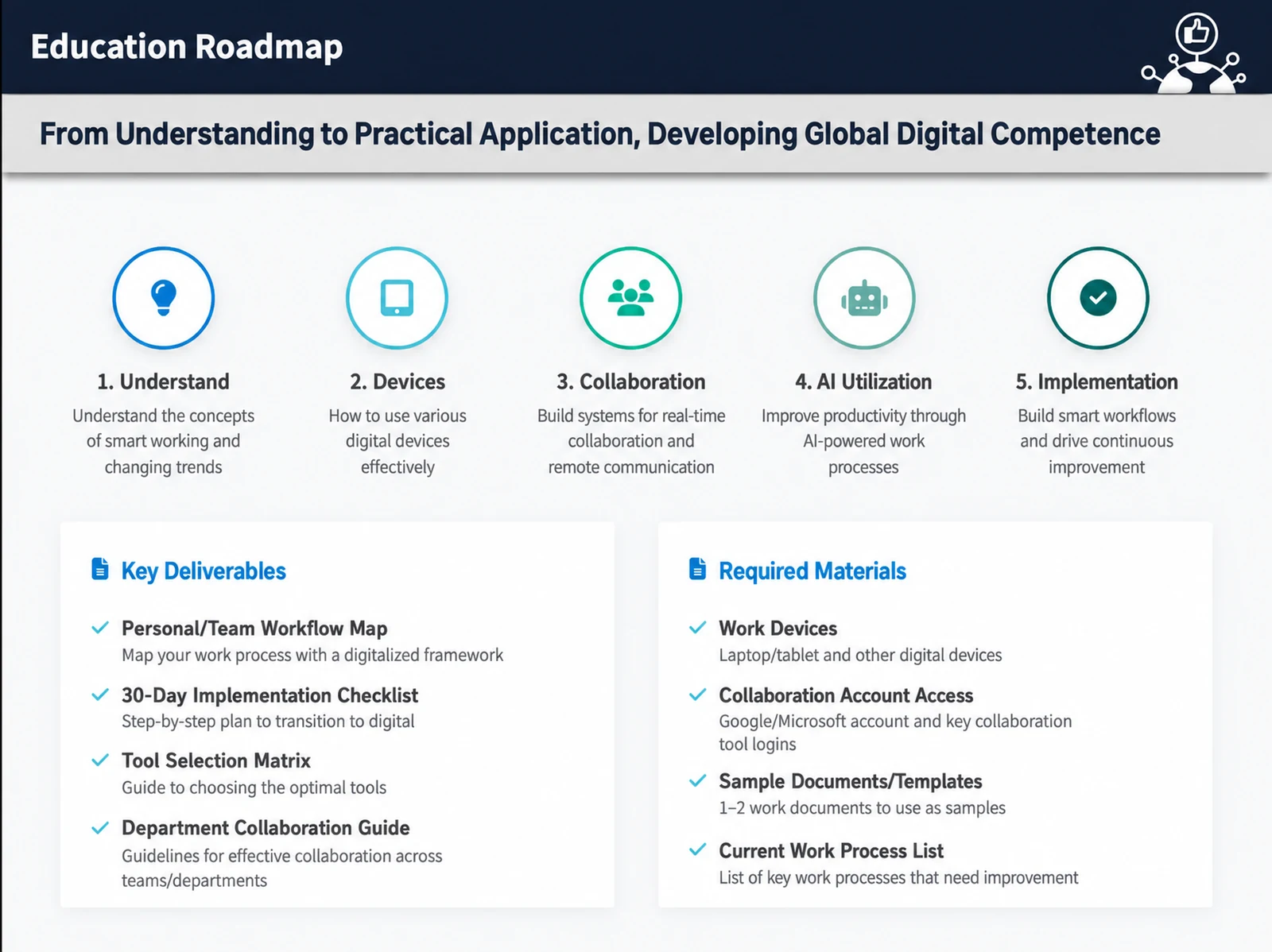
The IT Smart Working course is a 10-hour intensive program that systematically builds the work-efficiency skills essential in the digital transformation era. Led personally by Nanum Consulting CEO John Kim, this course is built around five core modules you can apply on the job right away: digital basics, remote work, smart working tools, effective presentations, and contact management. The customized curriculum helps participants maximize productivity in a changing work environment while strengthening creative, structured thinking. Its step-by-step approach is easy to follow even for employees with limited IT background, and participants rate it highly. The curriculum is proven by Nanum Consulting’s training experience with 50+ major corporations and institutions.
Who is this course for?
Designed for every professional who wants to build an efficient work environment in the digital transformation era. It is especially suited to employees of companies introducing remote or hybrid work, and to anyone who finds smart working tools difficult to use.
What will you learn?
- Building structured, creative thinking for greater work efficiency
- Systematically build foundational knowledge of IT smart working
Curriculum
- Concepts, Storytelling, and the Need for Logic (MECE and Logic Tree)
- Types of planning, folder management, file creation, backup basics
- Digital Literacy & Digital Transformation
- Digital Transformation Case Studies
- Desktop and laptop setup and internet use (building your own complete setup plan)
- Choosing the Right Smartphone and Using Apps (Recommended Business Headsets) / BYOD
- Choosing and using the right tablet PC for the job (iPad, Galaxy Tab, Surface)
- Chrome settings, data backup methods, and using a NAS (always staying open to new tools)
- Comparing popular collaboration tools (team): JANDI, G Suite, Trello, Notion, Todoist
- Schedule management and collaboration tools (personal): Google Calendar, Evernote, Canva, and more
- Digital Whiteboards: BeeCanvas, Epic Pen / Survey Tasks (Google Forms)
- Outlining (Workflowy) / Mind Mapping (Xmind)
- Platform comparison: Zoom, Teams, Google Meet, Webex, Hangouts, Skype
- Device setup: dual monitors, webcam, headset, microphone, lighting
- Using Breakout Rooms: Chat, File Sharing, Screen Sharing, Annotations, etc.
- Work support apps: Google Slides, Google Sheets, Mentimeter, Slido
- Dynamic presentations with PPT, Keynote, and Prezi
- Easy Video Shooting & Editing with Movavi
- Business card scanners, Remember, and Google Contacts sync
- CRM with Bulk Email, Text Messaging, and KakaoTalk
Tools used in this course
Expected results / After the course
- Build working knowledge of the core tools for smart working
- Learn to use Keynote, Prezi, and Evernote
- Effective CRM and viral marketing methods
On-site training references
About the instructor

Related courses
We tailor this course to your company
From diagnosis to execution — Nanum Consulting
FAQ
IT Smart Working
The IT Smart Working course is a 10-hour intensive program that systematically builds the work-efficiency skills essential in the digital transformation era. Led by Nanum Consulting CEO John Kim
- Building structured, creative thinking for greater work efficiency
- Systematically build foundational knowledge of IT smart working
- Build working knowledge of the core tools for smart working
- Learn to use Keynote, Prezi, and Evernote
- Effective CRM and viral marketing methods
- Concepts, Storytelling, and the Need for Logic (MECE and Logic Tree)
- Types of planning, folder management, file creation, backup basics
- Digital Literacy & Digital Transformation
- Digital Transformation Case Studies
- Desktop and laptop setup and internet use (building your own complete setup plan)
- Choosing the Right Smartphone and Using Apps (Recommended Business Headsets) / BYOD
- Choosing and using the right tablet PC for the job (iPad, Galaxy Tab, Surface)
- Chrome settings, data backup methods, and using a NAS (always staying open to new tools)
- Comparing popular collaboration tools (team): JANDI, G Suite, Trello, Notion, Todoist
- Schedule management and collaboration tools (personal): Google Calendar, Evernote, Canva, and more
- Digital Whiteboards: BeeCanvas, Epic Pen / Survey Tasks (Google Forms)
- Outlining (Workflowy) / Mind Mapping (Xmind)
- Platform comparison: Zoom, Teams, Google Meet, Webex, Hangouts, Skype
- Device setup: dual monitors, webcam, headset, microphone, lighting
- Using Breakout Rooms: Chat, File Sharing, Screen Sharing, Annotations, etc.
- Work support apps: Google Slides, Google Sheets, Mentimeter, Slido
- Dynamic presentations with PPT, Keynote, and Prezi
- Easy Video Shooting & Editing with Movavi
- Business card scanners, Remember, and Google Contacts sync
- CRM with Bulk Email, Text Messaging, and KakaoTalk