AI Tools Training (by Use Case)
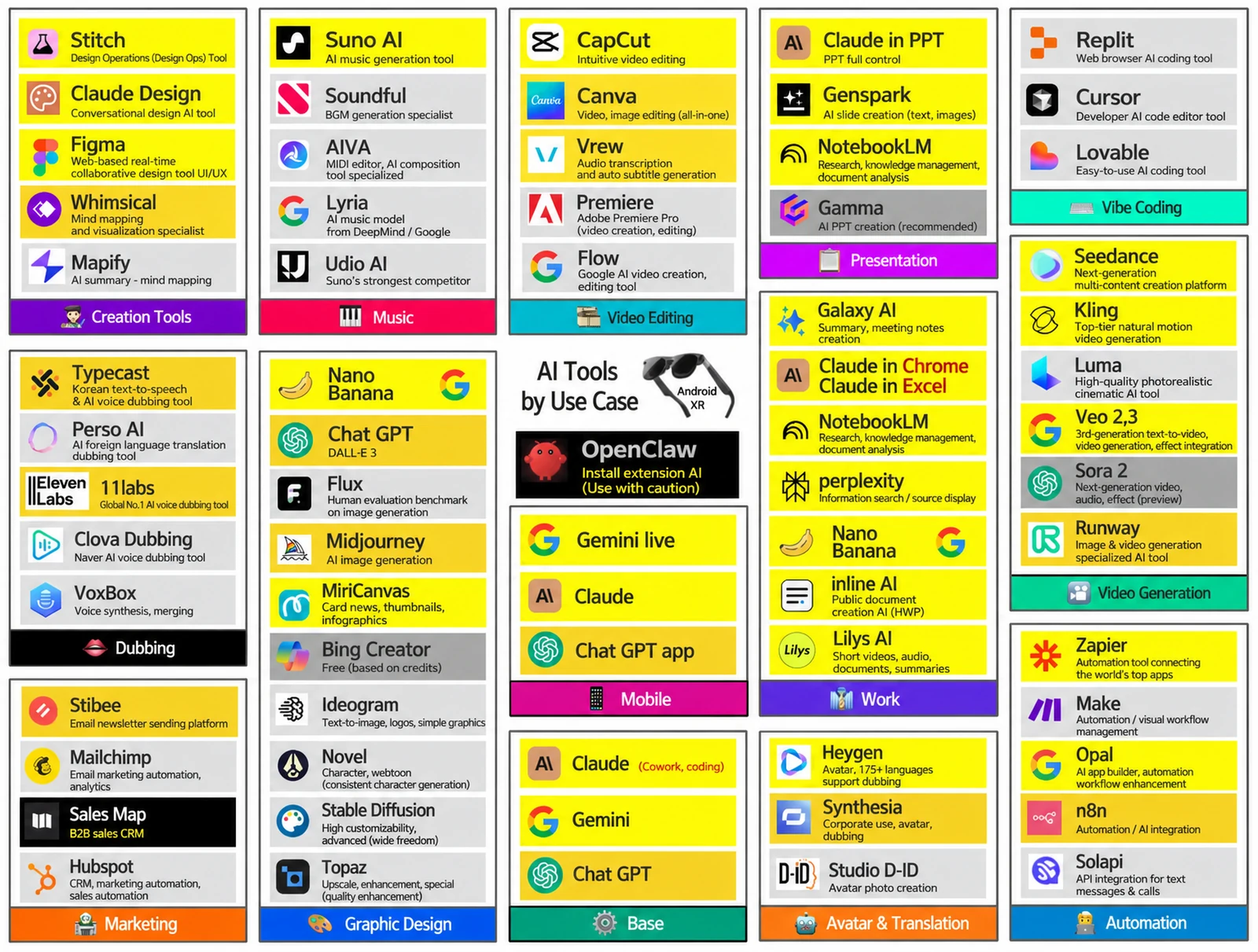
Nanum Consulting’s AI Tools Training is a hands-on corporate training program that builds generative AI content production skills in 8 hours. From text, image, video, and audio generation to slide automation, mobile AI, and XR expansion, participants learn how to use AI tools across every area through workflows, so they can apply them on the job right after training. Led by John Kim, CEO and lead instructor, the 8-module program covers everything from AI tool trends to connecting automation across the organization, offering an integrated AI strategy rather than instruction on individual tools. The curriculum draws on training delivered to 50+ major corporations and institutions.
💻 Start learning this topic with an online course →Who is this course for?
Designed for marketers, content creators, video production teams, planners, and anyone in any role who wants to use AI tools at work. It is especially well suited to employees who want to apply generative AI in their daily work and boost efficiency.
What will you learn?
- Quickly build generative-AI-based content creation and automation skills
- Workflow-centered learning you can apply on the job right away
Curriculum
- Structuring prompts by purpose (summarize, expand, change tone)
- ChatGPT vs. Gemini: differences in reasoning and response style
- Research with Perplexity & verifying sources
- Writing automation: patterns for marketing, reports, and training copy
- Hands-on practice: rewriting, translating & version control
- Output: 3 purpose-driven writing templates
- Roles of Midjourney / Stable Diffusion / Ideogram
- Generate a basic concept sketch with Nano Banana
- Understanding prompt variables (style, camera, composition, material)
- Reflecting brand identity (color / mood / emotion)
- Converting images into slide, web, and video formats
- Output: 1 key image + 3 derivatives (poster / thumbnail / icon)
- Turning an idea into a scene structure (6 cuts)
- Designing tone and mood with Opal / Runway
- Writing Veo prompts (action, environment, viewpoint, texture)
- The role of the storyboard and minimum production rules
- Designing scripts with narration and subtitles in mind
- Output: scene breakdown and draft script (1 set)
- CapCut essentials: cuts, transitions, and speed control
- Vrew subtitle-based auto editing & audio editing
- Connect images, video, and slides with Flow
- Improving quality with Topaz upscaling and noise removal
- Balancing information density & story rhythm in short videos
- Output: 1 finished 20–40 second video
- Comparing Suno, Lyria, and Soundful
- Music structure by purpose: intro / main / outro
- Setting voice tone with 11labs / Typecast
- Matching video and image mood with background music (BGM)
- Rules for combining sound, narration, and sound effects
- Output: 30-second background music + voice WAV + one sound-effects set
- Document summaries & evidence extraction with NotebookLM
- Generating slide outlines automatically with Gamma
- Drafting a structured PowerPoint deck with Genspark
- Organizing documents & tables with Microsoft 365 Copilot
- Structuring key pages that combine images and video
- Output: one single-page key slide
- Organizing spoken ideas with Gemini Live
- ChatGPT app: shoot, then convert to a script instantly
- Galaxy AI: calls, meetings, and translation
- Designing an on-the-go routine for content planning, notes, and organizing
- Mobile workflow: shoot → edit → check audience response
- Output: one single-take message video
- Understanding n8n / Zapier / Make automation flows
- Automating text messages and notifications with Solapi
- HubSpot / Mailchimp campaign automation
- Options for automating video and image content distribution
- Criteria for automating repetitive work: “trigger, action, data”
- Output: 1 automation flow + 1 reminder message
Tools used in this course
Expected results / After the course
- Build all-in-one production skills across text, images, video, and music
- Maximize work efficiency through automation and workflow design
On-site training references
About the instructor

Related courses
Start with an Online Course
Before you book on-site training, preview the essentials of this topic in an online course.
An introductory hands-on course for building work tools that run on plain conversational instructions.
Use AI in your daily work, from lesson prep to content creation.
We tailor this course to your company
From diagnosis to execution — Nanum Consulting
FAQ
AI Tools Training (by Use Case)
Nanum Consulting’s AI Tools Training is a hands-on corporate training program that builds generative AI content production skills in 8 hours. From text, image, video, and audio generation to
- Quickly build generative-AI-based content creation and automation skills
- Workflow-centered learning you can apply on the job right away
- Build all-in-one production skills across text, images, video, and music
- Maximize work efficiency through automation and workflow design
- Structuring prompts by purpose (summarize, expand, change tone)
- ChatGPT vs. Gemini: differences in reasoning and response style
- Research with Perplexity & verifying sources
- Writing automation: patterns for marketing, reports, and training copy
- Hands-on practice: rewriting, translating & version control
- Output: 3 purpose-driven writing templates
- Roles of Midjourney / Stable Diffusion / Ideogram
- Generate a basic concept sketch with Nano Banana
- Understanding prompt variables (style, camera, composition, material)
- Reflecting brand identity (color / mood / emotion)
- Converting images into slide, web, and video formats
- Output: 1 key image + 3 derivatives (poster / thumbnail / icon)
- Turning an idea into a scene structure (6 cuts)
- Designing tone and mood with Opal / Runway
- Writing Veo prompts (action, environment, viewpoint, texture)
- The role of the storyboard and minimum production rules
- Designing scripts with narration and subtitles in mind
- Output: scene breakdown and draft script (1 set)
- CapCut essentials: cuts, transitions, and speed control
- Vrew subtitle-based auto editing & audio editing
- Connect images, video, and slides with Flow
- Improving quality with Topaz upscaling and noise removal
- Balancing information density & story rhythm in short videos
- Output: 1 finished 20–40 second video
- Comparing Suno, Lyria, and Soundful
- Music structure by purpose: intro / main / outro
- Setting voice tone with 11labs / Typecast
- Matching video and image mood with background music (BGM)
- Rules for combining sound, narration, and sound effects
- Output: 30-second background music + voice WAV + one sound-effects set
- Document summaries & evidence extraction with NotebookLM
- Generating slide outlines automatically with Gamma
- Drafting a structured PowerPoint deck with Genspark
- Organizing documents & tables with Microsoft 365 Copilot
- Structuring key pages that combine images and video
- Output: one single-page key slide
- Organizing spoken ideas with Gemini Live
- ChatGPT app: shoot, then convert to a script instantly
- Galaxy AI: calls, meetings, and translation
- Designing an on-the-go routine for content planning, notes, and organizing
- Mobile workflow: shoot → edit → check audience response
- Output: one single-take message video
- Understanding n8n / Zapier / Make automation flows
- Automating text messages and notifications with Solapi
- HubSpot / Mailchimp campaign automation
- Options for automating video and image content distribution
- Criteria for automating repetitive work: “trigger, action, data”
- Output: 1 automation flow + 1 reminder message