B2B LinkedIn and Social Selling
From lead discovery to free samples, mass-production orders, and account maintenance — a hands-on course covering the entire B2B sales cycle
The B2B LinkedIn and Social Selling course is a 2-hour corporate training program on using LinkedIn not as a social network but as a living customer database, in an era when buyers no longer answer the phone. Nanum Consulting CEO John Kim walks through 12 steps in order: starting with targeting and the buying center, then profile optimization, LinkedIn free and paid features, lead discovery, messaging and follow-up cadence, content strategy, contact collection and nurturing, proposals and free samples, mass-production orders, and Account Maintenance. It is designed for B2B sales, overseas sales, and marketing practitioners who want to build social selling into a single sales system that runs from targeting to mass-production orders, rather than a set of DM techniques. Through 5 hands-on exercises, participants complete a buying center mapping sheet, a headline, a target lead list, a set of ready-to-send messages, and their own 90-day action plan. The curriculum draws on Nanum Consulting's experience delivering training for 50+ major corporations and institutions.
💻 Start learning this topic with an online course →Who is this course for?
This course suits practitioners and leaders at companies and institutions that need B2B sales skills. It is especially recommended for organizations that want to narrow their target accounts with a target industry × application matrix and the 3 ICP elements, and map the 4 buying center roles in a visual sheet.
What will you learn?
- Narrow your focus with the target industry × application matrix and the 3 elements of an ICP, and visualize the 4 buying center roles in a mapping sheet
- Turn your profile into a landing page, choose among Free, Premium, and Sales Navigator based on target volume, and discover leads with the 8 key filters
- Design your reply rate with the 3 principles of connection requests, a 3-part first DM structure, and a D+0 to D+15 follow-up cadence, while avoiding the risk of account suspension
- Raise lead temperature through lead scoring and three nurturing touchpoints, convert to proposals, pre-samples, and mass-production orders, and manage execution with 5 KPIs and a 90-day action plan
Curriculum
- Buyers no longer pick up the phone — 70% of B2B buyers narrow their shortlist through search and content before ever meeting a sales rep
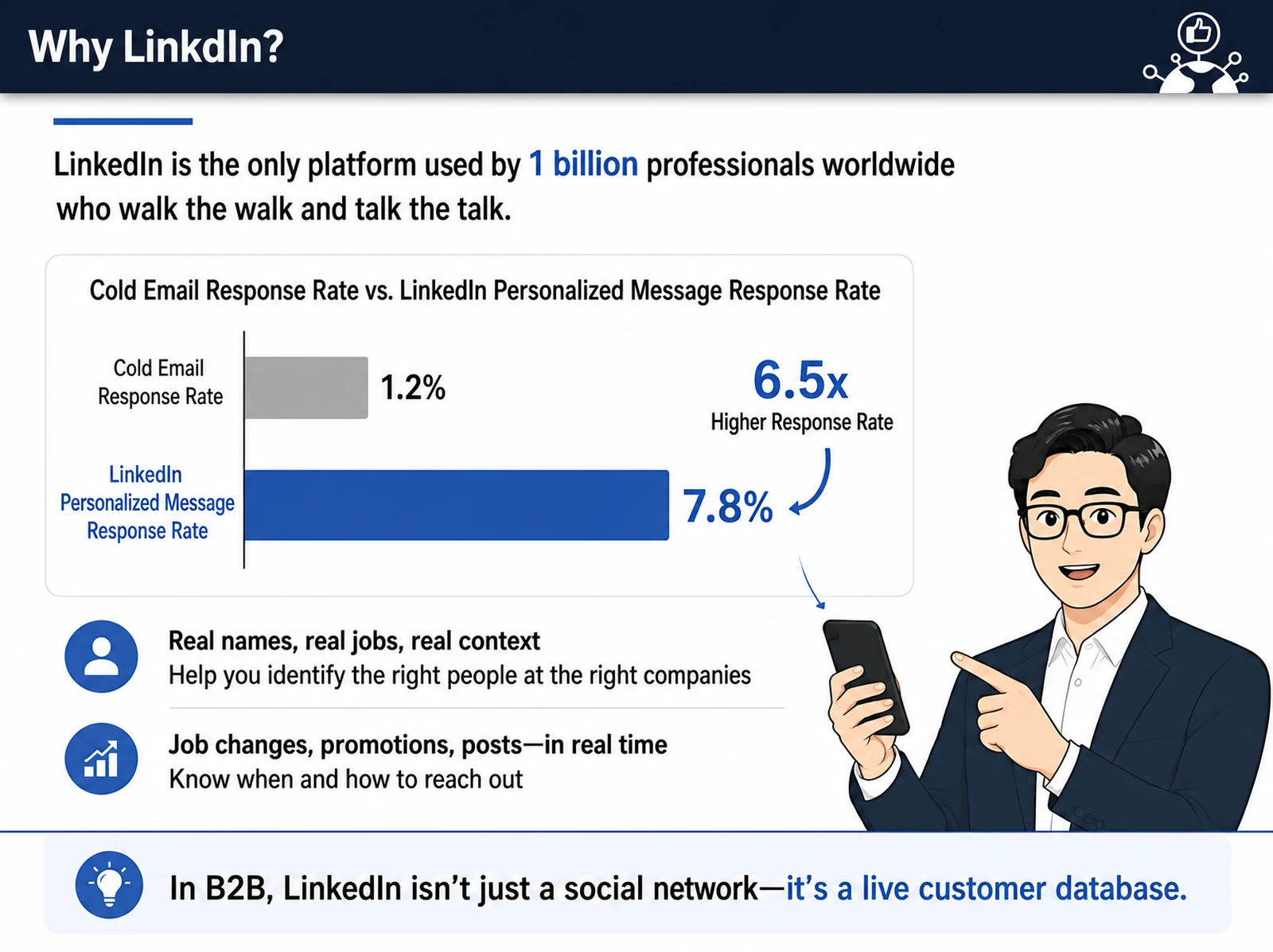
- Why LinkedIn — 1 billion people worldwide use their real names, job titles, and employers; in B2B it is not a social network but a living customer database
- Target industry × application matrix — “We can sell to everyone” means “we can sell to no one”; trace back to where your product ultimately ends up
- 3 elements of an ICP (Ideal Customer Profile) — company size and purchasing power / fit with technology roadmap / existing vendor landscape (dual-sourcing needs)
- Where to find customer lists — exhibitor lists from industry trade shows, member directories of industry associations, and reference pages on competitors’ websites (the most honest target list)
- The buying center: no one decides alone — on average 6–10 people are involved, and each speaks a different language: engineers (technical validation), quality (approval gate), purchasing (price and terms), executives (sponsor)
- Multi-threading — build allies inside the organization in this order: engineer → quality → purchasing → executive (with single-threading, the deal disappears when your one contact leaves)
- Exercise 1 (15 min): pick one target company, find candidates for the 4 buying center roles on LinkedIn, and draft a buying center mapping sheet — the blanks show where you have blind spots in your sales
- Profile: landing page vs. business card — a business card delivers information, while a landing page persuades with value (the 3-second first impression)
- Headline = one-line value proposition — “We help [target customer] solve [problem] with [method]”; your job title is what your company gave you, but your headline is your signboard in the market
- Learn headlines by example — “Solder materials expert who lowers SMT process defect rates,” “Cut overseas certification lead time by 50% for mid-sized manufacturers”
- About (story format) — a 3-paragraph structure centered on solving customer problems
- Experience (results-driven) — present key quantified results (e.g., defect rate improved by 30%)
- Featured (pinned materials) — pin your white paper and case studies at the top so your profile works as an always-on sales channel
- Drafting your profile with AI — enter your industry, experience, target customers, and pain points to generate 5 headline candidates and a 3-paragraph About section, strip out stiff, translated-sounding phrasing, and edit in your own voice (AI writes the draft, you are the editor-in-chief)
- Exercise 2 (15 min): apply the headline formula → generate and compare 5 candidates with AI → settle on 1 version you can use right away, based on peer feedback
- Free vs. Premium Business vs. Sales Navigator — 0/15/50 InMails, differences in search, filters, and lead management, KRW 0 (≈ US$1) / about KRW 50,000 (≈ US$37)–60,000 / about KRW 110,000 (≈ US$82)–130,000 per month
- Choose a plan by the number of targets you need to manage, not by extra features
- What you can do with a free account — search operators (AND, OR, NOT), introduction requests via 2nd-degree connections, and direct contact with members through industry group search
- Sales Navigator’s 8 key filters — job title, department, company size, industry, region, years in role, technical keywords, and recent activity (target people active within the last 30 days)
- Save, get alerts, and reach out at the right time — save leads → job change, promotion, and post alerts → start a conversation with a reason (timing is the best content)
- In B2B, personal accounts win — the company page is the brand base, while personal accounts act as sales offices for reach, direct communication, and meeting conversion
- 4 elements of the SSI (Social Selling Index) — build your professional brand, find the right people, engage with insights, build relationships; a score above 70 is the target for a social seller
- Exercise 3 (20 min): Combine the 8 key filters in the Sales Navigator free trial to pinpoint buying-center contacts, then save at least 3 target leads and log them in a sheet
- 3 principles for connection requests — keep it under 300 characters / leave out any sales pitch / mention common ground first (e.g., attending the same trade show)
- 3-part structure of the first DM — Observe (pick up public news about the target company) → Connect (synergy with our solution) → Low-pressure offer (an offer to send materials)
- Same company, different messages — for engineers (technical specs, technical reports) / for purchasing (TCO savings, lead-time data) / for executives (long-term partnership, high-level summary)
- Follow-up cadence — D+0 connection request → D+3 first message based on observation → D+8 new industry material, no pushing → D+15 approach a different role within the buying center (follow-up is not persistence, it is design)
- 3 don’ts to protect your account — automated messaging tools, a sales pitch right after a connection is accepted, and mass copy-pasted messages with no personal touch
- 4 content types — technical insights / application cases / industry trend commentary / behind-the-scenes (product ads get ignored, while useful, valuable information spreads)
- A sustainable rhythm of 1–2 posts a week — technical insights and success stories on Tuesday, light trends and field behind-the-scenes on Friday, and one technical white paper split into 5 posts
- Anatomy of a post people actually read — a two-line opening hook (to prompt “see more”), 1–2 sentences per paragraph, external link pinned in the first comment, no more than 3 hashtags
- Exercise 4 (20 min): confirm your target person, write a 300-character connection request and a 3-part first DM, then compare them with an AI-generated version to finish 1 ready-to-send message set
- 3 legitimate ways to get contact details — getting consent to email during a conversation / technical evaluation data as a lead magnet / LinkedIn lead gen forms (extracting contacts without delivering value is spam)
- Compliance — no automated scraping of personal data (it violates LinkedIn guidelines and can lead to a permanent ban), no email marketing without consent (GDPR, Korea’s Personal Information Protection Act), and a consent process is required whenever you collect information you plan to use
- Score every response — profile view 1 point / like 2 points / meaningful comment 3 points / DM reply 4 points / request for detailed technical materials 5 points
- 3 touchpoints to warm up leads — monthly technical newsletter → 45-minute virtual tech seminar (webinar) → in-person pre-meeting at a trade show (claim the first-vendor position before a need arises)
- LinkedIn × trade show hybrid — 4 weeks before the show, target visiting buyers and pre-book booth meetings; connect instantly via QR code during the show; 2 days later, follow up with a reference to your meeting plus technical materials
- 3 signals to move to a proposal — requests for specific technical requirements / referrals to other internal departments (quality, purchasing) / questions about the evaluation completion timeframe
- Samples are not free — attach conditions: a designated engineer, an agreed evaluation completion date, and a results review meeting scheduled in advance (samples sent unconditionally get ignored)
- The silent period during evaluation — share a usage guide right after shipping, encourage technical support inquiries in week 2, and send strong evaluation data from similar mid-term applications (support, not nagging)
- 4 qualification stages — sample approval → small-batch pilot run → final reliability approval → securing mass-production volume and negotiating the purchase
- The real work begins after you win the order — regular technical review meetings / early alignment on the next roadmap / tracking job moves among your day-to-day contacts / cross-sell expansion; successful references feed the next lead
- 5 KPIs — SSI of 70+ (weekly), connection request acceptance rate of 30% (weekly), first-DM response rate of 15–20% (weekly), meeting conversion of 30% of repliers (monthly), final sample conversion of 40% of technical meetings (quarterly)
- 90-day execution roadmap — Month 1 (complete profile, save 100 targets, SSI 60) / Month 2 (5 personalized touches a day on average, 1 post a week) / Month 3 (proposals to leads scoring 8+, at least 1 sample sent)
- Exercise 5 (20 min): define your resources and targets → set monthly goals and a 30-minute weekday routine → finish your 90-day action plan, including one likely obstacle and how to overcome it
- 4 ready-to-use templates — buying center mapping sheet / follow-up cadence scenarios (D+0 to D+15) / 10 customized message templates / KPI activity tracker sheet
Expected results / After the course
- Build the skill to turn touchpoints into conversations at the level of LinkedIn personalized messages (7.8% response rate), 6.5 times the 1.2% response rate of cold email
- Build a 5-KPI goal management system — SSI of 70+, 30% connection request acceptance, 15–20% first-DM response rate, 30% of repliers converted to meetings, 40% of technical meetings converted to final sample orders
- Put it to work right after training with 5 exercise deliverables (buying-center mapping sheet, final headline, 3+ leads, message set, 90-day action plan) and 4 ready-to-use templates
On-site training references
About the instructor

Related courses
Start with an Online Course
Before you book on-site training, preview the essentials of this topic in an online course.
We tailor this course to your company
From diagnosis to execution — Nanum Consulting
FAQ

B2B LinkedIn and Social Selling
From lead discovery to free samples, mass-production orders, and account maintenance — a hands-on course covering the entire B2B sales cycle
- Narrow your focus with the target industry × application matrix and the 3 elements of an ICP, and visualize the 4 buying center roles in a mapping sheet
- Turn your profile into a landing page, choose among Free, Premium, and Sales Navigator based on target volume, and discover leads with the 8 key filters
- Design your reply rate with the 3 principles of connection requests, a 3-part first DM structure, and a D+0 to D+15 follow-up cadence, while avoiding the risk of account suspension
- Raise lead temperature through lead scoring and three nurturing touchpoints, convert to proposals, pre-samples, and mass-production orders, and manage execution with 5 KPIs and a 90-day action plan
- Build the skill to turn touchpoints into conversations at the level of LinkedIn personalized messages (7.8% response rate), 6.5 times the 1.2% response rate of cold email
- Build a 5-KPI goal management system — SSI of 70+, 30% connection request acceptance, 15–20% first-DM response rate, 30% of repliers converted to meetings, 40% of technical meetings converted to final sample orders
- Put it to work right after training with 5 exercise deliverables (buying-center mapping sheet, final headline, 3+ leads, message set, 90-day action plan) and 4 ready-to-use templates
- Buyers no longer pick up the phone — 70% of B2B buyers narrow their shortlist through search and content before ever meeting a sales rep
- Why LinkedIn — 1 billion people worldwide use their real names, job titles, and employers; in B2B it is not a social network but a living customer database
- Target industry × application matrix — “We can sell to everyone” means “we can sell to no one”; trace back to where your product ultimately ends up
- 3 elements of an ICP (Ideal Customer Profile) — company size and purchasing power / fit with technology roadmap / existing vendor landscape (dual-sourcing needs)
- Where to find customer lists — exhibitor lists from industry trade shows, member directories of industry associations, and reference pages on competitors’ websites (the most honest target list)
- The buying center: no one decides alone — on average 6–10 people are involved, and each speaks a different language: engineers (technical validation), quality (approval gate), purchasing (price and terms), executives (sponsor)
- Multi-threading — build allies inside the organization in this order: engineer → quality → purchasing → executive (with single-threading, the deal disappears when your one contact leaves)
- Exercise 1 (15 min): pick one target company, find candidates for the 4 buying center roles on LinkedIn, and draft a buying center mapping sheet — the blanks show where you have blind spots in your sales
- Profile: landing page vs. business card — a business card delivers information, while a landing page persuades with value (the 3-second first impression)
- Headline = one-line value proposition — “We help [target customer] solve [problem] with [method]”; your job title is what your company gave you, but your headline is your signboard in the market
- Learn headlines by example — “Solder materials expert who lowers SMT process defect rates,” “Cut overseas certification lead time by 50% for mid-sized manufacturers”
- About (story format) — a 3-paragraph structure centered on solving customer problems
- Experience (results-driven) — present key quantified results (e.g., defect rate improved by 30%)
- Featured (pinned materials) — pin your white paper and case studies at the top so your profile works as an always-on sales channel
- Drafting your profile with AI — enter your industry, experience, target customers, and pain points to generate 5 headline candidates and a 3-paragraph About section, strip out stiff, translated-sounding phrasing, and edit in your own voice (AI writes the draft, you are the editor-in-chief)
- Exercise 2 (15 min): apply the headline formula → generate and compare 5 candidates with AI → settle on 1 version you can use right away, based on peer feedback
- Free vs. Premium Business vs. Sales Navigator — 0/15/50 InMails, differences in search, filters, and lead management, KRW 0 (≈ US$1) / about KRW 50,000 (≈ US$37)–60,000 / about KRW 110,000 (≈ US$82)–130,000 per month
- Choose a plan by the number of targets you need to manage, not by extra features
- What you can do with a free account — search operators (AND, OR, NOT), introduction requests via 2nd-degree connections, and direct contact with members through industry group search
- Sales Navigator’s 8 key filters — job title, department, company size, industry, region, years in role, technical keywords, and recent activity (target people active within the last 30 days)
- Save, get alerts, and reach out at the right time — save leads → job change, promotion, and post alerts → start a conversation with a reason (timing is the best content)
- In B2B, personal accounts win — the company page is the brand base, while personal accounts act as sales offices for reach, direct communication, and meeting conversion
- 4 elements of the SSI (Social Selling Index) — build your professional brand, find the right people, engage with insights, build relationships; a score above 70 is the target for a social seller
- Exercise 3 (20 min): Combine the 8 key filters in the Sales Navigator free trial to pinpoint buying-center contacts, then save at least 3 target leads and log them in a sheet
- 3 principles for connection requests — keep it under 300 characters / leave out any sales pitch / mention common ground first (e.g., attending the same trade show)
- 3-part structure of the first DM — Observe (pick up public news about the target company) → Connect (synergy with our solution) → Low-pressure offer (an offer to send materials)
- Same company, different messages — for engineers (technical specs, technical reports) / for purchasing (TCO savings, lead-time data) / for executives (long-term partnership, high-level summary)
- Follow-up cadence — D+0 connection request → D+3 first message based on observation → D+8 new industry material, no pushing → D+15 approach a different role within the buying center (follow-up is not persistence, it is design)
- 3 don’ts to protect your account — automated messaging tools, a sales pitch right after a connection is accepted, and mass copy-pasted messages with no personal touch
- 4 content types — technical insights / application cases / industry trend commentary / behind-the-scenes (product ads get ignored, while useful, valuable information spreads)
- A sustainable rhythm of 1–2 posts a week — technical insights and success stories on Tuesday, light trends and field behind-the-scenes on Friday, and one technical white paper split into 5 posts
- Anatomy of a post people actually read — a two-line opening hook (to prompt “see more”), 1–2 sentences per paragraph, external link pinned in the first comment, no more than 3 hashtags
- Exercise 4 (20 min): confirm your target person, write a 300-character connection request and a 3-part first DM, then compare them with an AI-generated version to finish 1 ready-to-send message set
- 3 legitimate ways to get contact details — getting consent to email during a conversation / technical evaluation data as a lead magnet / LinkedIn lead gen forms (extracting contacts without delivering value is spam)
- Compliance — no automated scraping of personal data (it violates LinkedIn guidelines and can lead to a permanent ban), no email marketing without consent (GDPR, Korea’s Personal Information Protection Act), and a consent process is required whenever you collect information you plan to use
- Score every response — profile view 1 point / like 2 points / meaningful comment 3 points / DM reply 4 points / request for detailed technical materials 5 points
- 3 touchpoints to warm up leads — monthly technical newsletter → 45-minute virtual tech seminar (webinar) → in-person pre-meeting at a trade show (claim the first-vendor position before a need arises)
- LinkedIn × trade show hybrid — 4 weeks before the show, target visiting buyers and pre-book booth meetings; connect instantly via QR code during the show; 2 days later, follow up with a reference to your meeting plus technical materials
- 3 signals to move to a proposal — requests for specific technical requirements / referrals to other internal departments (quality, purchasing) / questions about the evaluation completion timeframe
- Samples are not free — attach conditions: a designated engineer, an agreed evaluation completion date, and a results review meeting scheduled in advance (samples sent unconditionally get ignored)
- The silent period during evaluation — share a usage guide right after shipping, encourage technical support inquiries in week 2, and send strong evaluation data from similar mid-term applications (support, not nagging)
- 4 qualification stages — sample approval → small-batch pilot run → final reliability approval → securing mass-production volume and negotiating the purchase
- The real work begins after you win the order — regular technical review meetings / early alignment on the next roadmap / tracking job moves among your day-to-day contacts / cross-sell expansion; successful references feed the next lead
- 5 KPIs — SSI of 70+ (weekly), connection request acceptance rate of 30% (weekly), first-DM response rate of 15–20% (weekly), meeting conversion of 30% of repliers (monthly), final sample conversion of 40% of technical meetings (quarterly)
- 90-day execution roadmap — Month 1 (complete profile, save 100 targets, SSI 60) / Month 2 (5 personalized touches a day on average, 1 post a week) / Month 3 (proposals to leads scoring 8+, at least 1 sample sent)
- Exercise 5 (20 min): define your resources and targets → set monthly goals and a 30-minute weekday routine → finish your 90-day action plan, including one likely obstacle and how to overcome it
- 4 ready-to-use templates — buying center mapping sheet / follow-up cadence scenarios (D+0 to D+15) / 10 customized message templates / KPI activity tracker sheet