📊 Presentation · Planning

Presentation A to Z

Ask About This Course 💰 Get a Quote See All Courses
Presentation A to Z training image 1
⏱ Training hours2 hours
🏢 FormatOn-site delivery · Customized design
👤 InstructorJohn Kim
✅ Key outcomeLearn the basics of using presentation software

Presentation A to Z is a comprehensive program that takes you from presentation basics to real-world delivery in just 4 hours. Led personally by John Kim, CEO of Nanum Consulting, the course teaches step by step how presentations work, how to design effective slides, and how to deliver with skills you can use on the job right away. With a focus on creative thinking and structured presentation skills, it builds the practical ability to deliver presentations that are both logical and impactful. The curriculum is tailored to every level, from beginners who lack the fundamentals to practitioners who want to step up. It has been proven in Nanum Consulting’s training for 50+ major corporations and institutions.

Who is this course for?

Designed for professionals who need to present or report at work, managers who want to learn presentation skills systematically, and sales and marketing staff who must present effectively to clients. Open to everyone from beginners with little presentation experience to intermediate learners looking to upgrade their skills.

What will you learn?

  • Build structured, creative thinking to improve presentation skills
  • Systematically learn the fundamentals of presentations
  • Improve the presenter’s PT skills

Curriculum

Module 1: Presentation Basics
  • How presentation tools are changing, and the skills that go with them
  • Slideware and ZUI (Zooming User Interface)
  • The 8 key elements of slide design, and density
  • Presentation delivery skills, a preparation mind map, and 5Flow
Module 2: Presentation Mechanics
  • Defining the audience persona (Before & After check)
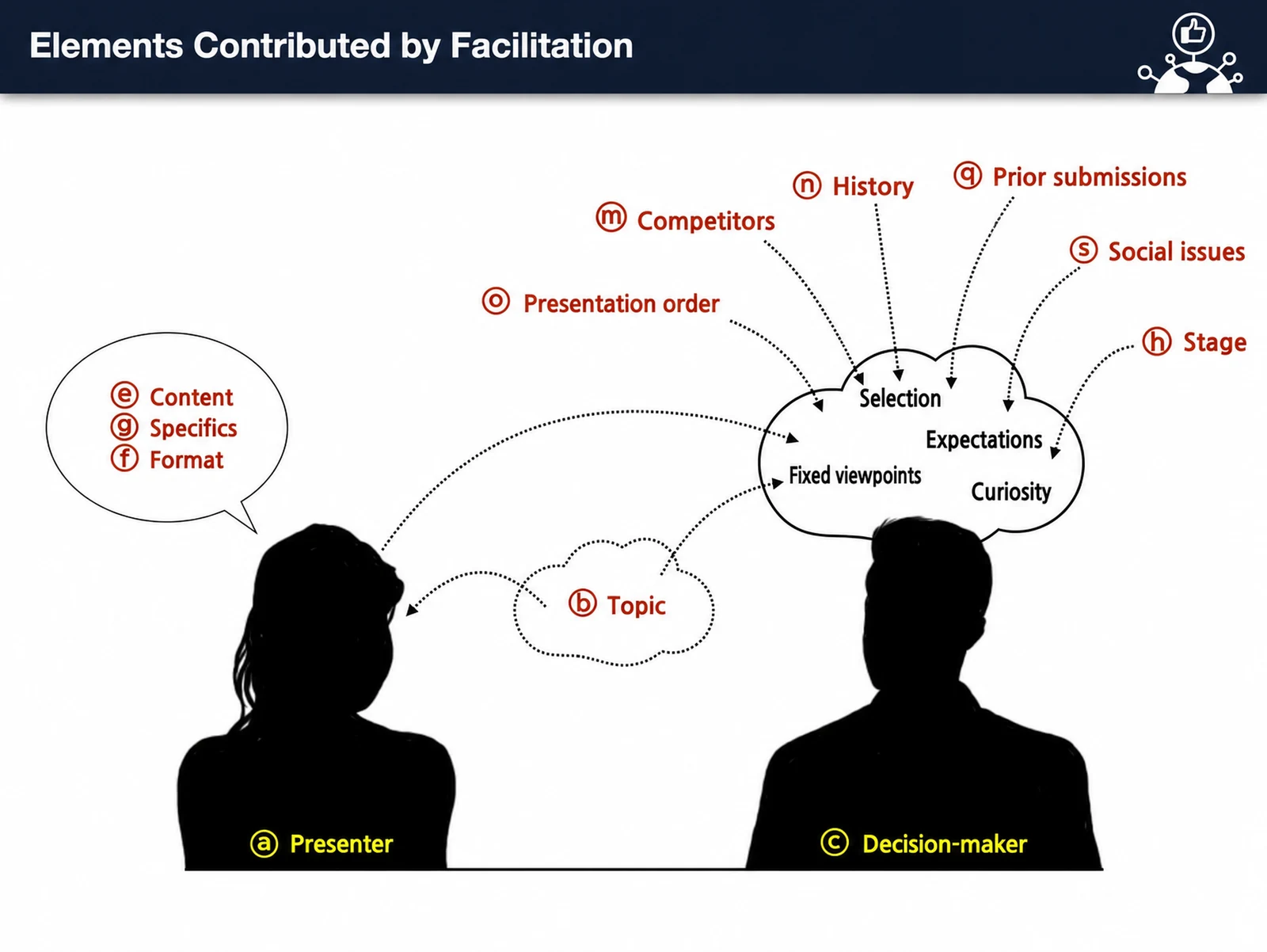
  • Topic, content, format, speech, props, timing, sequence, history, etc.
  • Presentation Value Chain analysis
  • Planning, storytelling, data collection & analysis, design & delivery
Module 3: Slide Design
  • Fonts and colors: internal vs. external use
  • Images, icons, and videos: sharing best practices
  • Tips & know-how for clean, fast slide creation
  • Building effective tables, charts & infographics
Module 4: Practical Presentation Techniques
  • Crisis management (space, microphone, systems)
  • Presentation space and IT device usage
  • Presentation techniques that adapt to your audience
  • Fundamentals and Use of Internal Presentations / Q&A

Expected results / After the course

  • Learn the basics of using presentation software
  • Learn how to use each tool effectively
  • Learn and practice effective, innovative presentation techniques

On-site training references

Chungbuk National UniversityKumoh National Institute of TechnologySeoul Business AgencyKyungnam UniversityDaekyeung UniversityKorea Nuclear Cooperation FoundationCJ ENM·NEW IDDaegu Digital Innovation AgencyHyosung Information SystemsKangnam UniversityKorea Women in Nuclear Professionals AssociationSoonchunhyang University HospitalUSTKorea Labor FoundationChungnam Sports Association for the DisabledBrand IndexTMCKSatrec InitiativeHwaseung CorporationMinistry of Employment and LaborKorea Institute of Meteorological Industry TechnologyDaehan SugarNational Museum of KoreaJeonnam Provincial GovernmentSeoul Global CenterGyeongnam Webtoon CampusSitedotOurhomeGyeongbuk Province Telecom & Broadcasting Civil Servant TrainingKoh Young Technologyetc.

We tailor this course to your company

From diagnosis to execution — Nanum Consulting

FAQ

Designed for professionals who need to present or report at work, managers who want to learn presentation skills systematically, and sales and marketing staff who must present effectively to clients. Open to everyone from beginners with little presentation experience to intermediate learners looking to upgrade their skills.
John Kim’s “Presentation A to Z” covers everything from theoretical structure (Intro-Body-Closing) to hands-on production tools (PowerPoint, Keynote, Prezi). Its four-module curriculum teaches presentation fundamentals and practical techniques in one session, so you can apply what you learn directly at work.
Over 4 hours, participants study four modules (PT basics, mechanisms, slide design, and practical techniques) intensively and pick up the core skills efficiently. Theory and practice go hand in hand, so participants can apply what they learn at work right after the session.
John Kim is a specialist instructor in presentation skills with experience delivering training at many large and mid-sized corporations. He earns high satisfaction ratings from participants for his structured four-module format and hands-on approach, and the curriculum is known for being practical enough to apply at work immediately after training.
Nanum Consulting website QR code — scan with your phone to open

Presentation A to Z

Presentation A to Z is a comprehensive program that takes you from presentation basics to live delivery in just 4 hours. Led personally by John Kim, CEO of Nanum Consulting, the

Duration2 hours
FieldPresentation · Planning
InstructorJohn Kim
Training objectives
  • Build structured, creative thinking to improve presentation skills
  • Systematically learn the fundamentals of presentations
  • Improve the presenter’s PT skills
Expected results
  • Learn the basics of using presentation software
  • Learn how to use each tool effectively
  • Learn and practice effective, innovative presentation techniques
Curriculum
Module 1Module 1: Presentation Basics
  • How presentation tools are changing, and the skills that go with them
  • Slideware and ZUI (Zooming User Interface)
  • The 8 key elements of slide design, and density
  • Presentation delivery skills, a preparation mind map, and 5Flow
Module 2Module 2: Presentation Mechanics
  • Defining the audience persona (Before & After check)
  • Topic, content, format, speech, props, timing, sequence, history, etc.
  • Presentation Value Chain analysis
  • Planning, storytelling, data collection & analysis, design & delivery
Module 3Module 3: Slide Design
  • Fonts and colors: internal vs. external use
  • Images, icons, and videos: sharing best practices
  • Tips & know-how for clean, fast slide creation
  • Building effective tables, charts & infographics
Module 4Module 4: Practical Presentation Techniques
  • Crisis management (space, microphone, systems)
  • Presentation space and IT device usage
  • Presentation techniques that adapt to your audience
  • Fundamentals and Use of Internal Presentations / Q&A

About the instructor
Instructor John Kim
John Kim, Lead Instructor
10 years in industry · 15 years teaching (3,000+ lectures)
Education
· MBA (advanced major: Marketing), Korea University Graduate School of Business (graduated)
· Sungkyunkwan University Consultant Program (completed)
· Sogang University Graduate School of Business, Short-Term MBA (completed)
· Seoul National University Lifelong Education Instructor Development Program (completed)
· Chung-Ang University, B.A. in English Language and Literature (graduated)
Experience
· Current: CEO, Nanum Consulting
· Formerly at Hyosung Corp., Daeduck Electronics and Shinhan Diamond: overseas assignments and strategic planning (10+ years)
· Current partner instructor, Expert Consulting
· Current: Partner instructor, PSI Consulting
· (Current) Partner instructor, Korea SMEs and Startups Agency and SME Training Institute
Credentials and publications
· Certified consultant
· Certified teacher
· Completed official IDEO Design Thinking training
· B2B Marketing Design (1 Apr 2025)
· The Chinese Diamond Tool Market: Present and Future (co-authored, Korea Tool Association)
· Battles That Changed History and Innovative Weapons (in progress)